Introduction to Unix Shell

You are not logged in.

Please Log In for full access to the web site.
Note that this link will take you to an external site (https://petrock.mit.edu) to authenticate, and then you will be redirected back to this page.

Practice what you have learned about the Unix Shell using the following problems! This is not a comprehensive list of practice problems, but we hope it is still helpful!

1) Navigating Files and Directories

Type out the flag for ls if you want a long listing format (include the -):

Type out the flag for ls if you want to include entries starting with "." (include the -):

Type out the full command to list a directory in reverse chronological order:

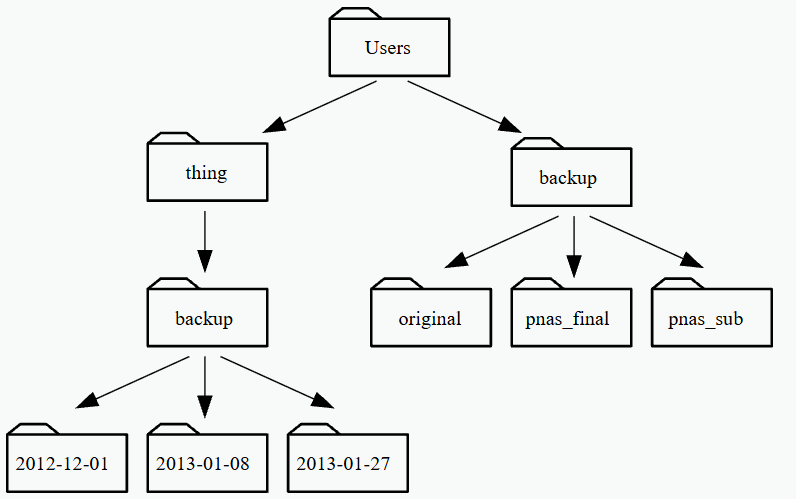
Starting from /Users/nelle/data, which of the following commands could Nelle use to navigate to her home directory, which is /Users/nelle?

path_pic

Using the filesystem diagram above, if pwd displays /Users/thing, what will ls -F ../backup display?

Using the filesystem diagram above, if pwd displays /Users/backup, and -r tells ls to display things in reverse order, what command will result in the following output: pnas_sub/ pnas_final/ original/

2) Working With Files and Directories

Type the command to generate a new file:

Which option correctly moves a file into a parent source directory?

Type the command to rename "statstics.txt" to "statistics.txt":

Type out the flag you would use to perform rm safely (include -):

What happens if you try to use the copy command with 3 file names, i.e "cp file1.txt file2.txt file3.txt"

Type out the command to list all files ending in ".csv":

Your directory contains files "myfile0.txt", "file1.txt", "file2.tx", and "file10.txt". Which command only lists "file1.txt" and "file2.txt":

Which mkdir flag does not throw an error if a directory exists already:

3) Pipes and Filters

Enter a list of the output if you run "sort -n" on a file with contents of "10 2 19 22 6":

Type out the command to append text to the end of a file:

What does the command "tail -n 2 animals.csv >> animals-subset.csv" do to the file animals-subset.csv :

In our current directory, we want to find the 3 files which have the least number of lines. Which command listed below would work?:

Type out the command to print out the first 3 lines of numbers.txt when sorted in numerical order:

Type the command to select the 2nd column of "animals.csv" using "," as a delimiter:

The "uniq" command filters out adjacent matching lines in a file. Type out the flag you would use with "uniq" to get a count of the number of times a line occurs (include -):

4) Loops

You have a loop
for datafile in *.pdb; do ls BLANK; done.
Fill in the BLANK to list a single datafile on each iteration.:

You want to loop through the files "file one.txt", "file two.txt" and "file three.txt". What do you need to do in order to avoid errors during your loop?:

You have a loop
for datafile in *.pdb; do cat $datafile >> all.pdb; done. True or False, you can safely check the loop behavior by modifying the inner command to be echo "cat $datafile >> all.pdb":
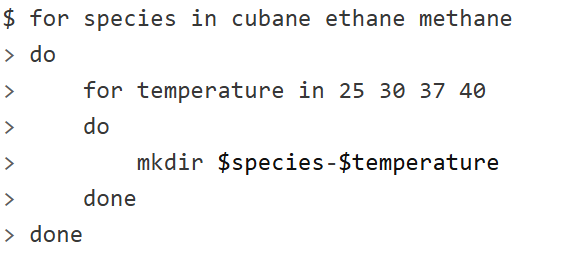
nested_loop_pic

In the above loop, select what directory name was created including the word cubane:

5) Shell Scripts

You may find it more helpful to practice writing bash scripts in your own terminal. If you need more of a refresher on shell scripts, take a look at the resources on the Materials Page

You can save commands in files (usually called shell scripts) for future re-use:

Type out the symbol(s) that refer to all of a shell script's command-line arguments:

You have a bash shell script called num_sort.sh with the command sort -n $1 in it. Type out the command you would use to call that script on the file file1.txt.:

6) Finding Things

Type out the command you would use if you wanted to search for a pattern in a file or standard input:

You have the haiku of of of of of / oh oh oh oh oh oh oh / off off off off off, where each / is a line break, in a file called bad_haiku.txt. Type out a command using only one word as your pattern, that would return the line of of of of of:

What grep flag would you use if you wanted to obtain your pattern from a file (include -):

Which command would find all files ending with .txt in the current directory and the subdirectories: